×
Table of Contents
Debugging Protractor Tests
Prepare your Protractor Code
- Add debugger keyword in your protractor code – Code execution will stop here !
  fit('should run the Global Goals View and test Vacation Semester Feature', () => {
    const waitTimeout = 400;
    waitByIdAndClick('nav-global-goals-button');
    validateHeadline('Meine Ziele');
    debugger;
    ...
Setup Debug Session
| Action | Action Details |
|---|---|
| Start Protractor with —inspect-brk switch | $ node –inspect-brk node_modules/protractor/bin/protractor e2e/protractor.conf.js |
|
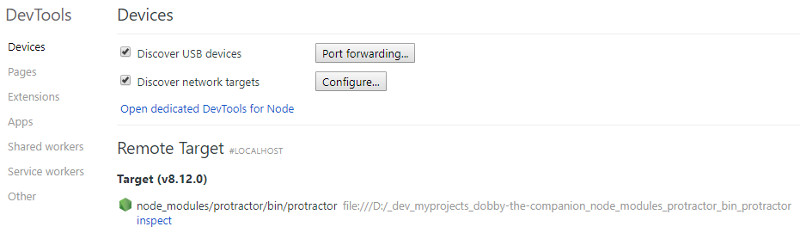
|
|
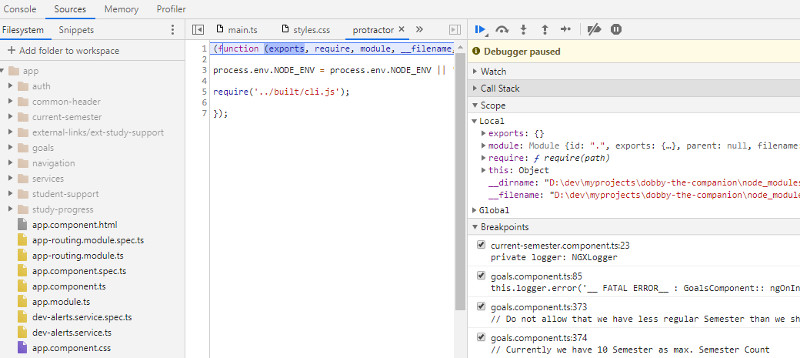
|
|
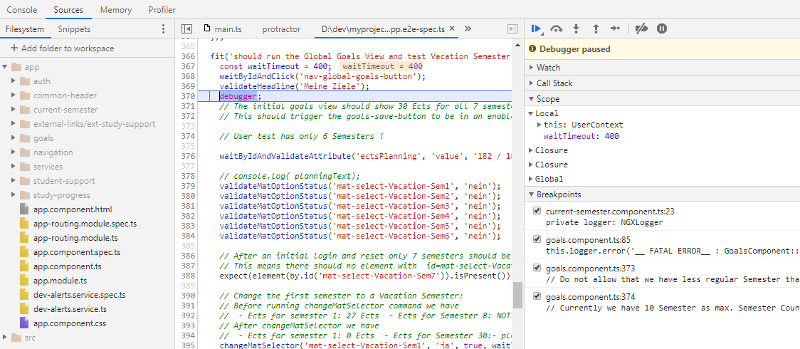
|
Reference
Helper Function for running Protractor Tests
Calling Ajax to reset data before each run
import {HttpClient} from 'protractor-http-client';
..
 beforeEach(() => {
    const http = new HttpClient('http://localhost:8080/');
    http.failOnError = true;
    const resetResponse = http.get('/pythia/api/data/resetdata/test3');
    expect(resetResponse.statusCode).toEqual(200);
...
Scroll Down Browser Window
 const scrollDown = function () {
    browser.executeScript('window.scrollTo(0,document.body.scrollHeight);').then(function () {
      browser.sleep(500);
    });
  };
Closing an External Browser Window
  const closeBrowserWindow = function () {
    // Close the external browser window
    browser.getAllWindowHandles().then((handles) => {
      browser.driver.switchTo().window(handles[1]);
      browser.driver.close();
      browser.driver.switchTo().window(handles[0]);
    });
  };